
Download the Auto Super Resolution Package, Microsoft Apps to get started.
Key specifications and details
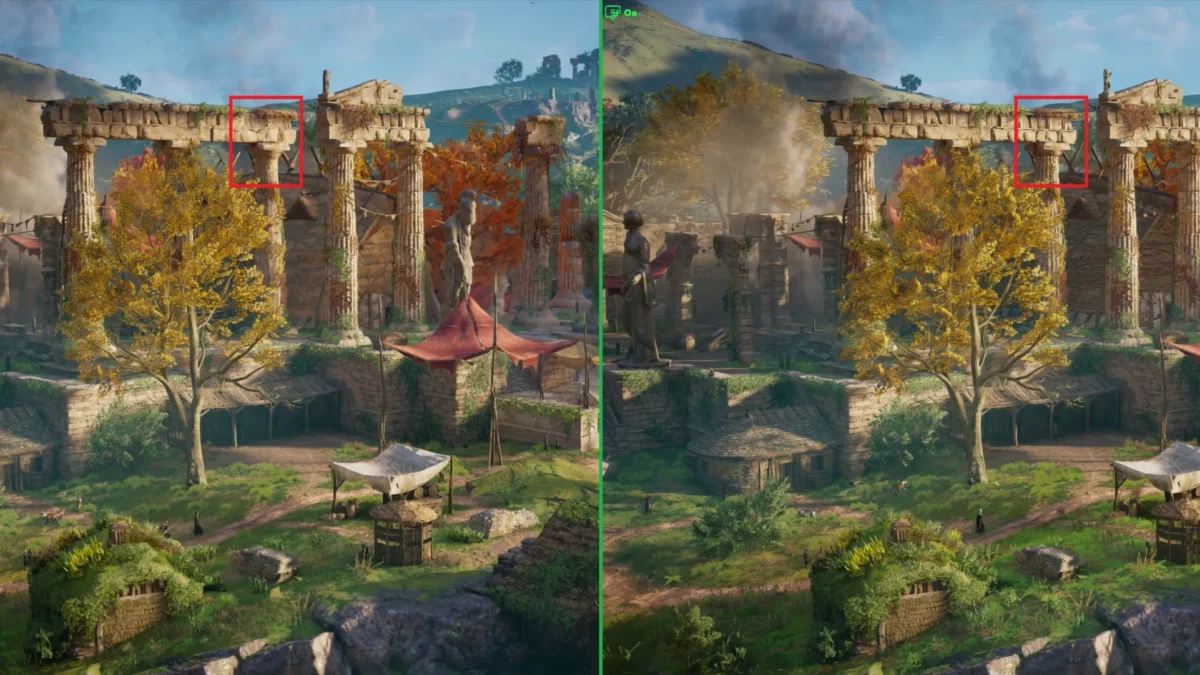
- Auto SR is designed to help games that struggle to hit playable frame rates at higher resolutions by allowing the game to render at a lower resolution, then using NPU-based upscaling to reach a higher effective resolution. By rendering at a lower resolution and then using AI to upscale the image, Auto SR can deliver smoother frame rates while maintaining visuals consistent with the developer’s original artistic vision. Here’s an example of what that looks like and what gamers get out of it.
- Not to worry, players do not need to understand graphics settings, rendering techniques, or specific technologies to achieve smoother gameplay, better image quality, and improved device efficiency.
- Once you are set up, try Auto SR with your favorite DirectX games (DX10 or later) or one of these: Assassin’s Creed: Shadows, Assassin’s Creed: Valhalla, Assetto Corsa, Avowed, Control, DOOM: The Dark Ages, Far Cry 6, Frostpunk 2, Grounded 2, Psychonauts 2, Rise of the Tomb Raider, The Outer Worlds 2, Tom Clancy’s Rainbow Six Siege.
- Texture-heavy games at higher resolutions and graphics settings are where you’ll see the biggest difference since that is where super resolution is needed most. Auto SR is most useful when a game is GPU-constrained and players want a better balance of image quality, performance, and battery life especially on low-powered devices.
- Auto SR unlocks higher visual fidelity that was previously out of reach for lower-spec hardware. In this example, Ultra High settings allows additional detail (such as the flower bed and tall grass) to be rendered by the game. Gamers can stop to smell the roses they previously wouldn’t have been able to see thanks to Auto SR.
- How is it working in your games? How does the setup and control feel?
Official source: DirectX Developer Blog


Community
0 comments